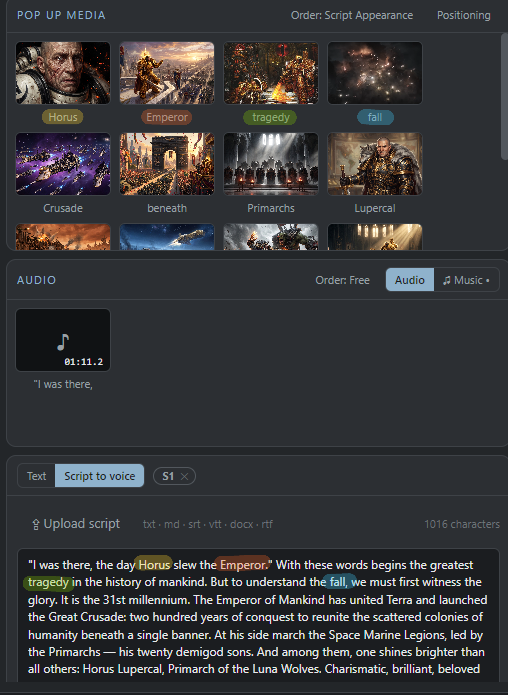
Drop a script and your media. AuraEdits builds the timeline, speaks your script with a neural voice, burns in subtitles — and pops your images in exactly when they're mentioned.
A real project, one screen: the script on the right became the voiceover, the subtitles and the media placement — and the reels are being cut straight on the finished timeline.
Press GENERATE and the full edit assembles itself: clips in order, voiceover laid down, subtitles timed to the word, images entering when their name is spoken, music with fades. You fine-tune — you don't build from zero.
Paste a script once: it becomes a natural AI voiceover and the subtitles of the video — same text, word-accurate timing, styled and editable block by block. Change the script, regenerate, everything follows.
Draw a 9:16 window over the finished video, mark start and end, press Done. Every reel exports alongside the main video — transitions kept, subtitles refitted to vertical. One edit, many videos.
Name your images like the things you talk about. AuraEdits transcribes your voiceover offline and places every image on the timeline at the exact moment its name is spoken. No keyframes, no dragging.
A photo called “colosseum.png” pops up when you say “Colosseum”. Rename a file, regenerate, done. You keep full control afterwards: drag, stretch, restyle any clip.
Press GENERATE and AuraEdits assembles everything: background clips in order, voiceover laid down, subtitles split and styled, pop-ups matched to speech — a finished timeline in seconds, ready to fine-tune or export straight to MP4.
Paste or upload a script (txt, docx, srt…) and turn it into a voiceover with natural neural voices — preview each voice before you commit.
Dead air detected and cut from the whole timeline in one click — video, audio and subtitles stay perfectly in sync.
Music automatically dips while speech is on screen, so your voice always cuts through.
See exactly where TikTok, Reels and Shorts draw their UI, before you export — no more buttons over your subtitles.
Record your voiceover inside the app with live level metering, then let the pipeline do the rest.
Horizontal clips sit on an elegant blurred backdrop, and one-click color slides give your titles a clean stage.